

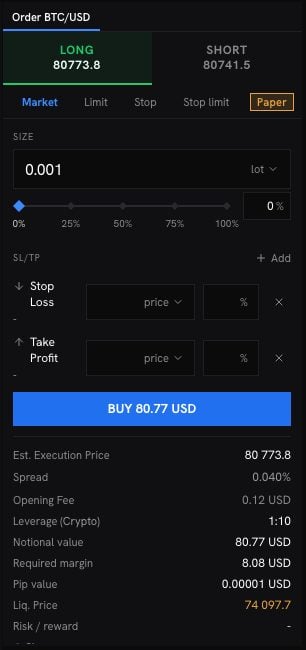
Steps
1
Pick a side
LONG if you think the price will rise, SHORT if it will fall. The price under each side includes the spread.
2
Choose the order type
A buy order is triggered by the ask, a sell order by the bid. A limit, stop or stop limit order waits in Open Orders until the price reaches it. No margin is held until it fills. Choose its Expiration: GTC (until you cancel it), Today, or a Specified date and time.
3
Set the size
Depending on the instrument and your preference, you enter the size in Lots, or as an amount with a leverage. With % Risk, you set the share of your balance you accept to lose at the stop loss, and the size is worked out for you.
4
Set the leverage
Click the leverage to open Adjust leverage. The dialog states the range for the instrument. A higher leverage ties up less margin and brings the liquidation price closer to the entry price.
5
Add a take profit and a stop loss, if you want
Both are optional. Each can be set as a price, in points, or as a result.To leave in steps, click Add a target level or Add a stop level and give each row the share of the order it closes, in percent. Together, the rows of one side close at most 100% of the order.A Trailing stop starts at the distance you set. Once the profit reaches that distance, the stop follows the price at it and never moves back.
6
Check the estimates and send
Before you send, the ticket shows the Est. Execution Price, the Spread, the Opening Fee, the Required margin, the Pip value, the Liq. Price, the Overnight swap, and the Risk / reward. Click the order button, check the summary and click Confirm order.
A market order is filled at the broker’s price on receipt, or refused. It is never filled against a stale quote. The price can move between the confirmation and the fill: beyond the slippage shown, the order is refused rather than filled worse.
How a stop loss fills
A stop loss closes at the market price once the price reaches it. In a fast or gapping market, it can close worse than its level. A take profit closes at its level or better. No exit is guaranteed. A stop loss placed beyond the liquidation price no longer protects you: the position would be liquidated first. The ticket refuses it.Why an order is refused
The ticket tells you why, next to the field concerned. The common reasons:- The market is closed, halted or paused.
- The instrument is close-only: open positions can be closed, no new ones opened.
- The stop loss or take profit is too close to the price, too far, or on the wrong side.
- The free margin on the trading account is too low, or the margin is below the minimum for an order.
- The size is outside the instrument’s range.
- The leverage is outside the range the instrument allows.
- There is no fresh price for the instrument right now. Try again once it quotes.
- The price moved further than your slippage tolerance before the order could be filled.
- Your account leverage changed since the ticket was priced. Check the ticket, then place the order again.